If you want more privacy online, a VPN and a proxy server both look like reasonable answers. Both sit between your device and the internet, and both hide your IP address from the sites you visit. What happens to your data along the way is where they differ, and that difference decides which one suits the job you have in mind.
What you need to know
- A proxy hides your IP address from websites but does not encrypt your internet traffic by itself.
- VPNs encrypt the internet traffic routed through the VPN, typically covering apps as well as your browser.
- Some free VPNs and proxies may collect user data or rely on advertising, so check how a free service is funded before using it..
- Server quality affects speed more than the choice between a proxy and a VPN.
- Neither tool makes you anonymous, because logins and accounts still identify you.
- Running both together adds setup work and rarely gives a consumer anything extra.
VPN vs. proxy: What's the difference?
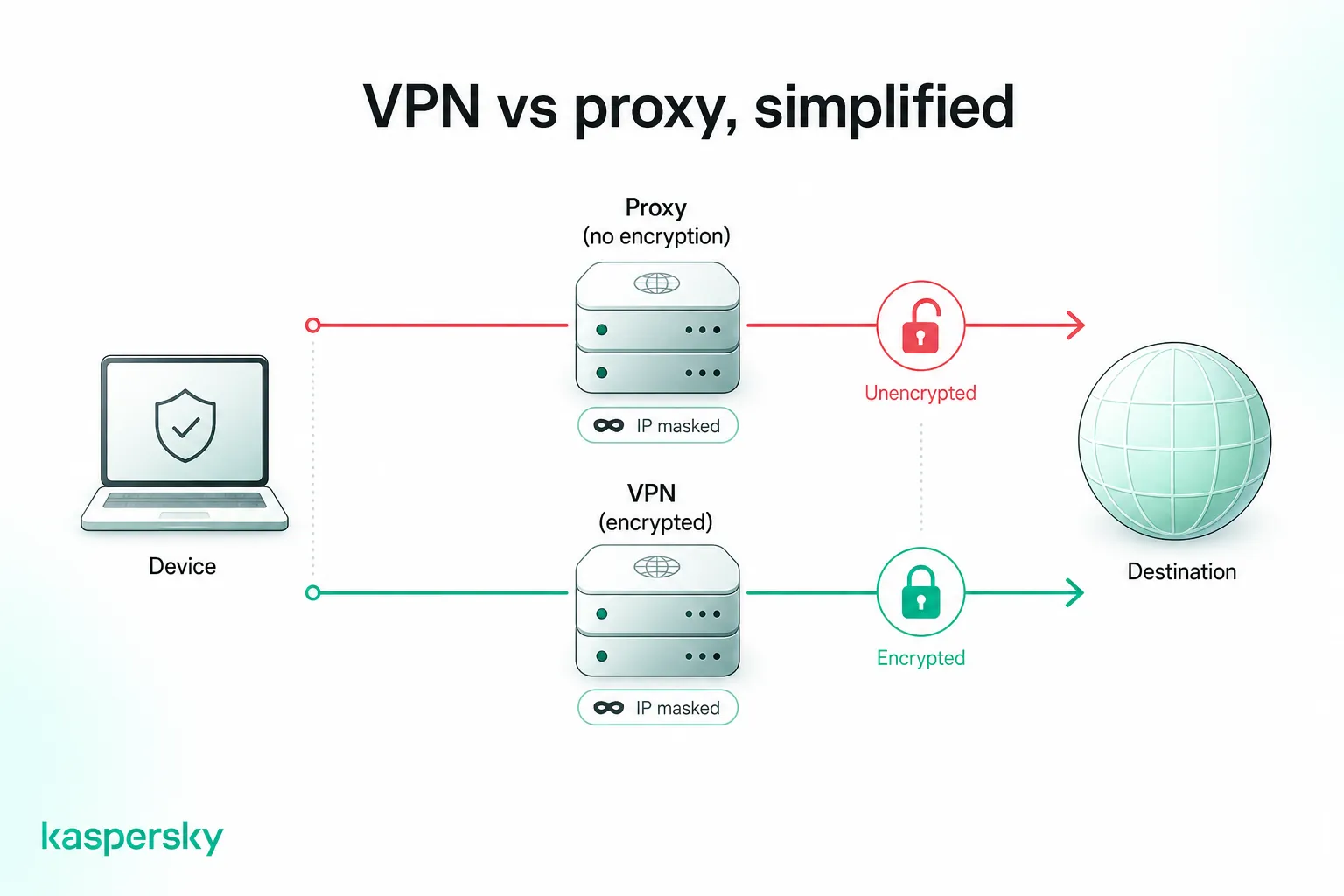
A proxy passes your traffic through another server so websites see its IP address instead of yours. A VPN does the same, then encrypts the connection and covers every app on your device, not just your browser.
The table below sets out a proxy server vs. VPN comparison for everyday use:
|
Proxy |
VPN |
|
|
Encryption |
None of its own |
Encrypts all traffic between your device and the VPN server |
|
Privacy |
Hides your IP address from the site you visit |
Hides your IP address and the contents of your traffic |
|
Speed |
Varies widely; free servers are often congested |
Small encryption overhead, usually offset by better infrastructure |
|
Security |
No protection for data in transit |
Protects data in transit on untrusted networks |
|
Traffic scope |
One app or browser at a time |
Every app on the operating system |
|
Common uses |
Testing, scraping, IP rotation, light geo-restrictions |
Public Wi-Fi, banking, remote work, everyday privacy |
What is a proxy server?
A proxy server is a middleman between your device and the internet. Your request goes to the proxy, which fetches the page and passes it back, so the site sees the proxy's IP address rather than yours.
Proxies typically work at the application level, meaning they only redirect traffic from the browser or app you configure to use them. Everything else on your device carries on connecting directly, which is why two apps on the same laptop can appear to be in different countries.
The traffic detour is what makes proxies useful for reaching content restricted by region. A UK viewer connecting through a US proxy may see the US version of a streaming catalog. Major streaming services now detect and block most proxy addresses, and using one can breach your subscription terms.
Not every proxy is something you choose as schools, workplaces, and libraries often run a transparent proxy that filters or blocks sites for everyone on the network. You may have passed through one without realizing it. Proxies come in several forms, including HTTP, HTTPS, SOCKS5, and residential.
What is a VPN?
VPN stands for virtual private network. A VPN creates an encrypted tunnel between your device and a VPN server, then sends all your internet traffic through it, hidden from anyone watching the connection.
VPNs work at the operating system level, so they redirect all your traffic, whether it comes from your browser or an app. Your internet service provider can see that you are connected to a VPN server, but not which sites you visit or what you send. That encryption also limits website tracking and makes surveillance of your connection harder.
When should you use a VPN or a proxy?
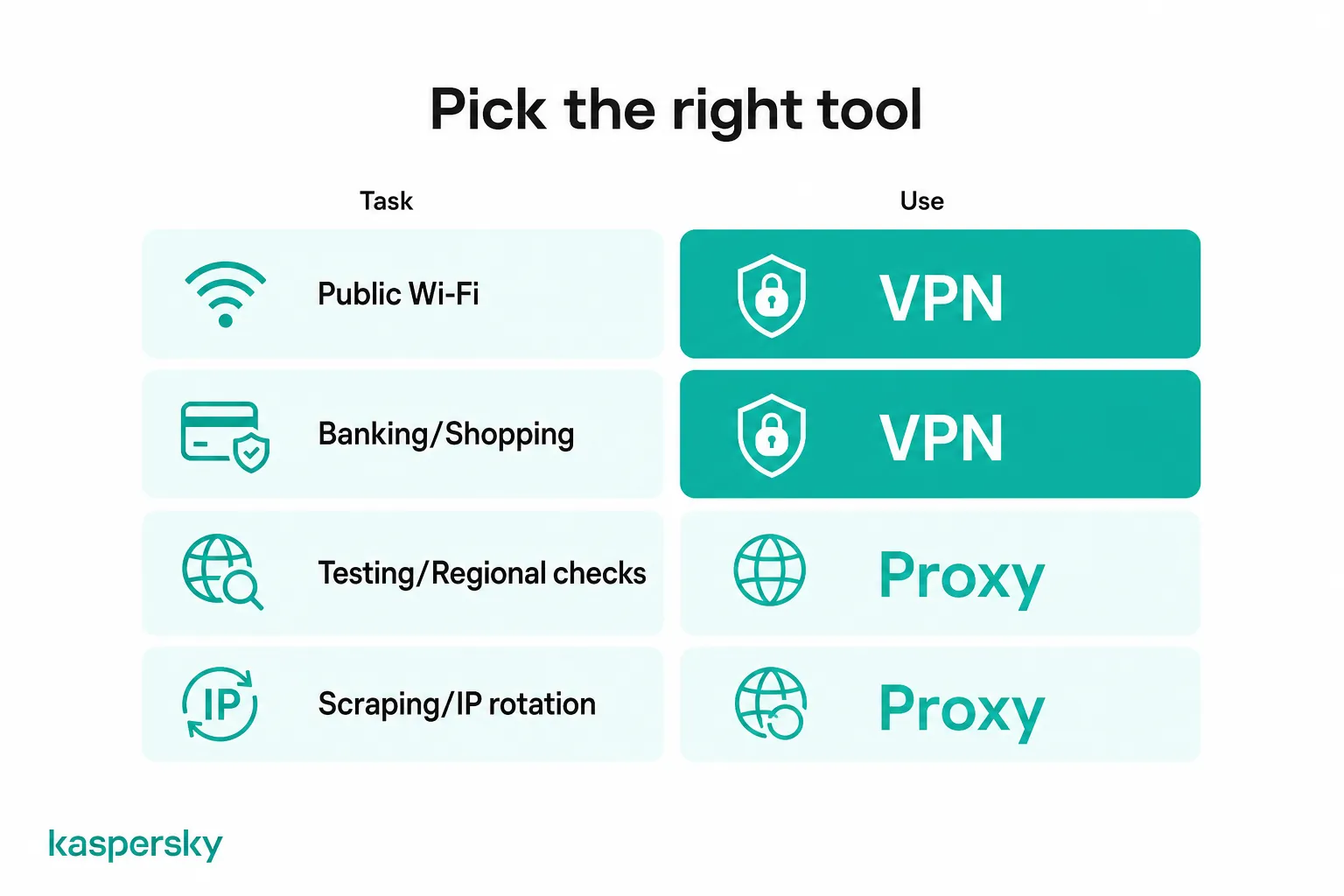
Choose a VPN when you want your data protected across everything you do online. A proxy makes sense when you need traffic to appear from another location for a single app or task, and privacy is not a priority.
When should you use a VPN?
Use a VPN whenever the data leaving your device needs to be protected. Public Wi-Fi, banking, shopping, and work systems all send information you would not want to be read in transit, and a VPN encrypts all of it.
VPNS are a good solution for:
- Public Wi-Fi in cafes, hotels, and airports: unsecured or malicious networks can expose unencrypted traffic, while a VPN encrypts traffic between your device and the VPN server.
- Online banking and shopping: these activities involve sensitive information such as login credentials and payment details, making a secure connection particularly important.
- Remote work: company systems often expect a VPN before granting access, and the encrypted tunnel keeps internal traffic away from whatever network you happen to be on.
- Traveling and streaming: services you pay for at home may be unavailable while traveling abroad. Connecting to a VPN server in your home country may help you access services, including streaming platforms, where the provider allows it.
For everyday browsing, a VPN can also limit what your internet service provider can learn about your online activity.
When should you use a proxy?
A proxy suits tasks where the IP address matters and the content does not. Developers checking regional versions of a website, or teams collecting public web data, use proxies because the traffic only needs to appear from somewhere else.
Proxies are a good solution for:
- Web scraping and automated testing: the tools need many addresses, not encryption. Rotating through a pool of proxy IPs keeps a site from throttling requests that all arrive from one place.
- Marketers and developers: check how a page renders for visitors in another country. A proxy set in one browser leaves the rest of the machine untouched, which makes side-by-side comparisons easier.
- Light geo-restrictions: keep in mind that results vary and many services now block known proxy ranges.
None of this is security work. A proxy does not encrypt anything, and it therefore belongs in tasks where the traffic is public or already protected by HTTPS.
What are the key differences between a VPN and a proxy server?
A VPN encrypts your traffic and a proxy does not. The issue of traffic encryption therefore sets what each tool can protect and how much you can trust VPNs and proxies with sensitive data.
How do VPNs and proxies protect your privacy?
A VPN hides your IP address and encrypts what you send, so your internet service provider sees only that you are connected to a VPN. Proxies hide the IP address alone and leave the contents readable.
Websites can still identify you through cookies, account logins, and browser fingerprinting regardless of which IP address you arrive from. Data encryption protects the contents of your connection rather than your identity.
On a proxy connection, anyone positioned between you and the proxy can read whatever is not encrypted by HTTPS. This includes DNS lookups in many setups, which then reveal the domains you request even when the pages themselves are protected.
A properly configured VPN can also route DNS requests through the encrypted tunnel, reducing what your internet service provider or local network can see.
Independently tested and awarded by the industry's leading labs.



How does VPN encryption compare with HTTPS encryption?
HTTPS encrypts the connection between your browser and one website. A VPN encrypts everything leaving your device, including app traffic and DNS lookups, so the two work at different layers rather than replacing each other.
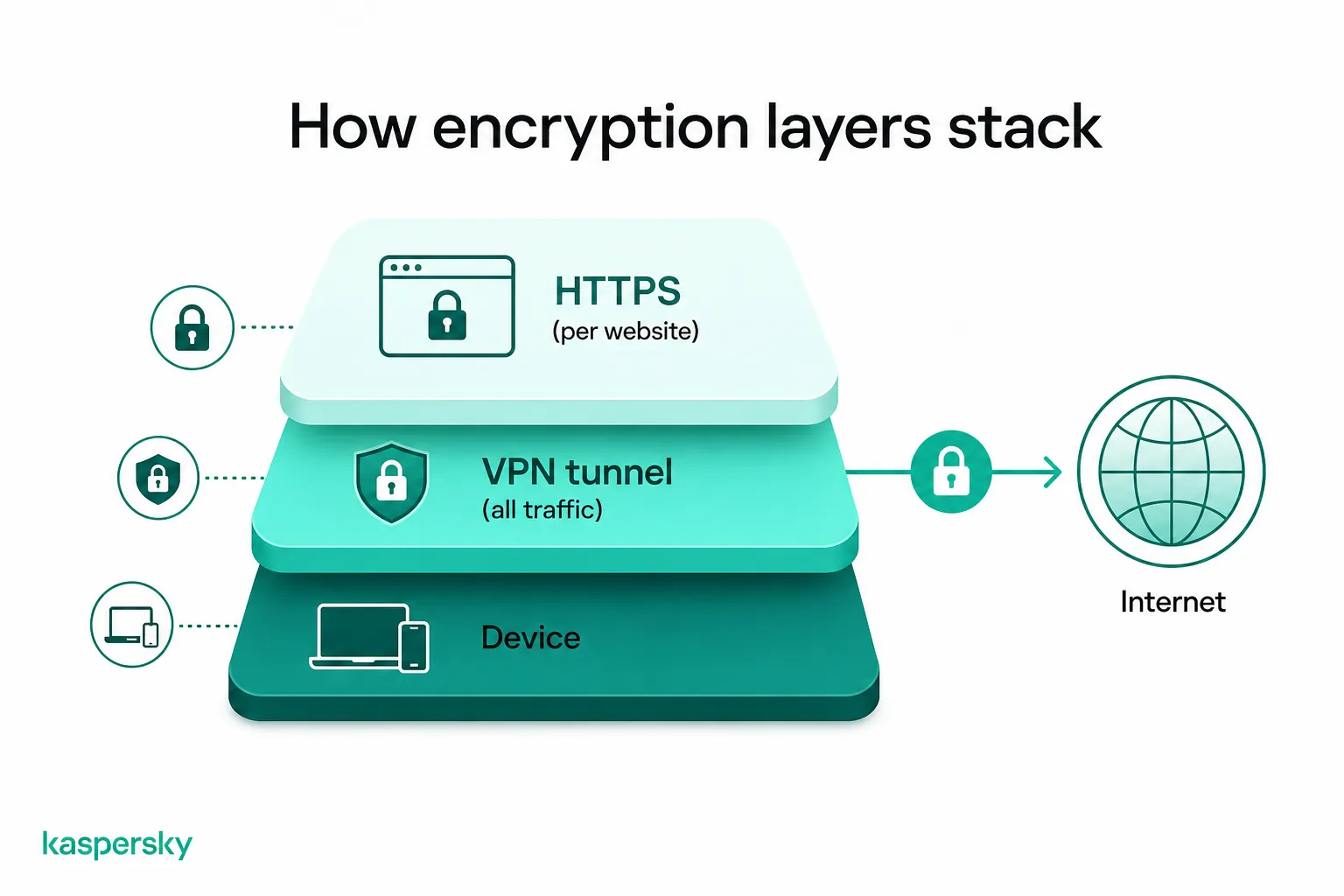
HTTPS is standard now, so the padlock just means the page is encrypted. Without a VPN, your internet service provider or someone monitoring the local network may still be able to see which services or domains you connect to, along with information such as connection times and the amount of data transferred, even though HTTPS protects the content itself.
A VPN hides that outer layer by sending everything to one encrypted endpoint first. The two stack together rather than compete, and running a VPN does not remove the need for HTTPS on the sites you use.
How do VPNs and proxies affect speed and performance?
Both route your traffic through an extra server, so both cost some speed. The real bottleneck is a distant or overloaded server, not encryption. That's why a paid VPN usually beats a free proxy, whose servers are packed with users sharing the same bandwidth.
Modern devices and VPN protocols can handle encryption efficiently, so encryption is often only one factor affecting performance. Server distance, congestion, protocol choice, and the provider's infrastructure can also have a significant impact on speed.
This is where free proxies fall down, since they run on cheap servers and pull in huge numbers of users who all share the same connection. The claim that proxies are faster holds only when the proxy is not overloaded.
For performance, choosing a nearby, well-maintained server with sufficient capacity can matter more than whether the service is a proxy or a VPN.
What are the limitations of a VPN and a proxy?
Neither a VPN nor a proxy makes you anonymous. A VPN hides your traffic from the network you are on, but any site you log into still knows who you are. Proxies do not hide the traffic at all.
A VPN also changes who you have to trust rather than removing the need to trust anyone. Your provider now sees everything your internet provider used to see, therefore what matters is whether that company keeps logs, and if that claim has been independently verified.
Proxies have a different limitation: they generally do not encrypt your traffic themselves, so protection may depend on other technologies such as HTTPS. This also means you need to trust the proxy operator, particularly when using an unknown or free service.
Both also get blocked. Streaming services and plenty of corporate networks keep lists of known VPN and proxy addresses, connections from them simply fail, often with no explanation beyond a generic error.
What are the different types of proxy servers?
Proxy servers differ in the traffic they handle and where they sit in the connection. A reverse proxy works for the website, handling the requests coming in. HTTP, HTTPS, SOCKS5, and residential proxies work for you, carrying your traffic out.
HTTP and HTTPS proxies
HTTP and HTTPS proxies handle browser traffic. You add the proxy address to your browser settings, or install an extension when the browser has no built-in support. Page requests then travel through the remote server.
The encryption on an HTTPS connection comes from the website, not the proxy. Check that the site has a current SSL certificate before entering anything sensitive, because the proxy adds no protection of its own.
Typical uses for HTTP and HTTPS proxies are casual browsing and reaching sites limited by region. Both types swap out your IP address and leave the rest of the connection alone.
SOCKS5 and residential proxies
SOCKS5 proxies are not limited to web pages. They pass any kind of traffic, which makes them workable for file sharing, streaming clients, and online games that an HTTP proxy cannot handle.
Residential proxies route your requests through IP addresses assigned to real home connections rather than data centers. Sites treat that traffic as ordinary visitor traffic, which is why testers and researchers use residential proxies when a data center address would be blocked.
With these proxies there are two things to watch: some residential services build their address pools from users who never explicitly agreed to share their connection, and neither type encrypts your traffic.
Are free VPNs and free proxies safe?
Some free VPNs and proxies are safe but many are not. Servers cost money to run, so it is important to understand how a free service is funded. Some providers rely on advertising or data collection, while others subsidize free plans through paid subscriptions.
What are the risks of free VPNs and proxies?
Free services often log what you do and sell it to advertisers or data brokers. Some inject their own ads into the pages you load, and a few have shipped tracking code or outright malware inside the apps themselves.
In addition, performance becomes an issue as free providers pack a lot of users onto limited hardware, this leads to dropped connections and speed fluctuations.
Open proxies carry the highest risk because anyone can set one up and there is no way to know who runs it. Traffic sent through an open proxy can be logged, or altered before it reaches you, and you would have no way of knowing.
How do you choose a trustworthy VPN?
Look for a no-logs policy that an independent auditor has tested, a jurisdiction that limits who can compel disclosure, and published transparency reports. These show whether the provider can hand over your activity at all.
Use this checklist to find a trustworthy VPN:
- Audited no-logs policy: an independent audit can provide evidence that the provider's systems and practices align with its stated no-logs policy.
- Jurisdiction: where a provider is registered decides which authorities can compel it to produce data, and whether it can be ordered to keep quiet about doing so.
- Transparency reports: regular reports on the data requests received, and how the provider responded to each, show the policy holding up under real pressure rather than in theory.
- Kill switch: cuts your connection the moment the tunnel fails, so your real IP address is never exposed while you reconnect.
- DNS leak protection: keeps your lookups inside the tunnel. Without it, your internet provider can still see every domain you visit even though the traffic itself is encrypted.
- Audited apps: the logging policy and the software are different. Check that the apps have been reviewed too, since that is where flaws in the implementation show up.
Can you use a VPN and a proxy together?
Yes, though most people gain nothing from it. A VPN already hides your IP address like a proxy does, and encrypts your traffic on top of that. Running both together just means more to set up and another thing that can go wrong.
The exception is a network you do not control. If a transparent proxy at school or work blocks certain sites, a VPN can route around the filter, though whether you should depends on the rules you agreed to when you joined that network.
Running the two the other way round is useful when a tester sends one browser through a residential proxy while a VPN covers everything else on the machine, keeping that task separate from the rest of their traffic.
For everyday use, one well-chosen VPN does the work. Kaspersky VPN hides your IP address from the sites you visit, keeps no record of what you do, and protects every app on the device rather than a single browser.
Related Articles:
- How to hide your IP address
- What is IP spoofing and how to prevent it
- VPN for gaming guide
- Smartphone VPNs: All you need to know
Related Products:
FAQs
Is a VPN better than a proxy?
For privacy, yes. A VPN encrypts your traffic and covers every app on your device, while a proxy only changes the IP address for one app. Proxies cost less and suit narrow technical tasks like testing.
Does a proxy hide your IP address?
Yes. Sites you reach through a proxy see the proxy's IP address instead of yours. Your internet provider still sees you connecting to the proxy, and anything you send through it stays readable, since a proxy adds no encryption.
Does HTTPS replace a VPN?
No. HTTPS encrypts what you exchange with one website. A VPN encrypts everything leaving your device, including app traffic and DNS lookups. On HTTPS alone, anyone on a public network can still see which sites you visit.
Can a VPN and a proxy be used together?
Yes. The usual setup routes one browser through a proxy while the VPN covers the whole device, but most people see no benefit. The extra hop slows the connection and gives you a second service to trust.
Can a VPN still be blocked or detected?
Yes. Streaming services and some workplaces detect and block VPN server addresses, and a few countries restrict VPN use outright. Switching servers often works, though no provider can guarantee a connection will get through.